End-of-Day Report (Z-Report)
At the end of each shift or day, the end-of-day report is performed. It generates the Z-report — a complete, TSE-signed summary of all revenue, payments, expenses, vouchers, and customer credit movements. The Z-report is tax-relevant and will be requested by the tax authority during an audit.
Structure of the End-of-Day Page
The end-of-day page is divided into two tabs:
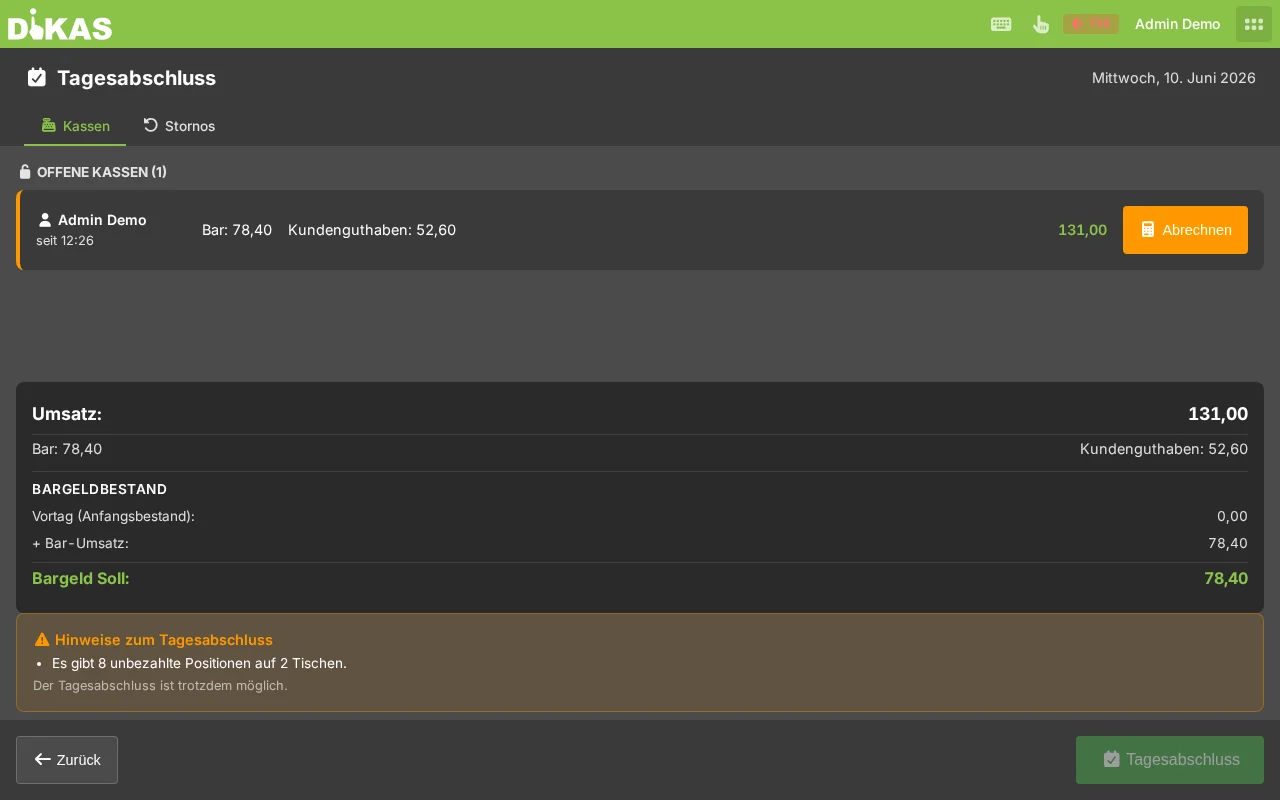
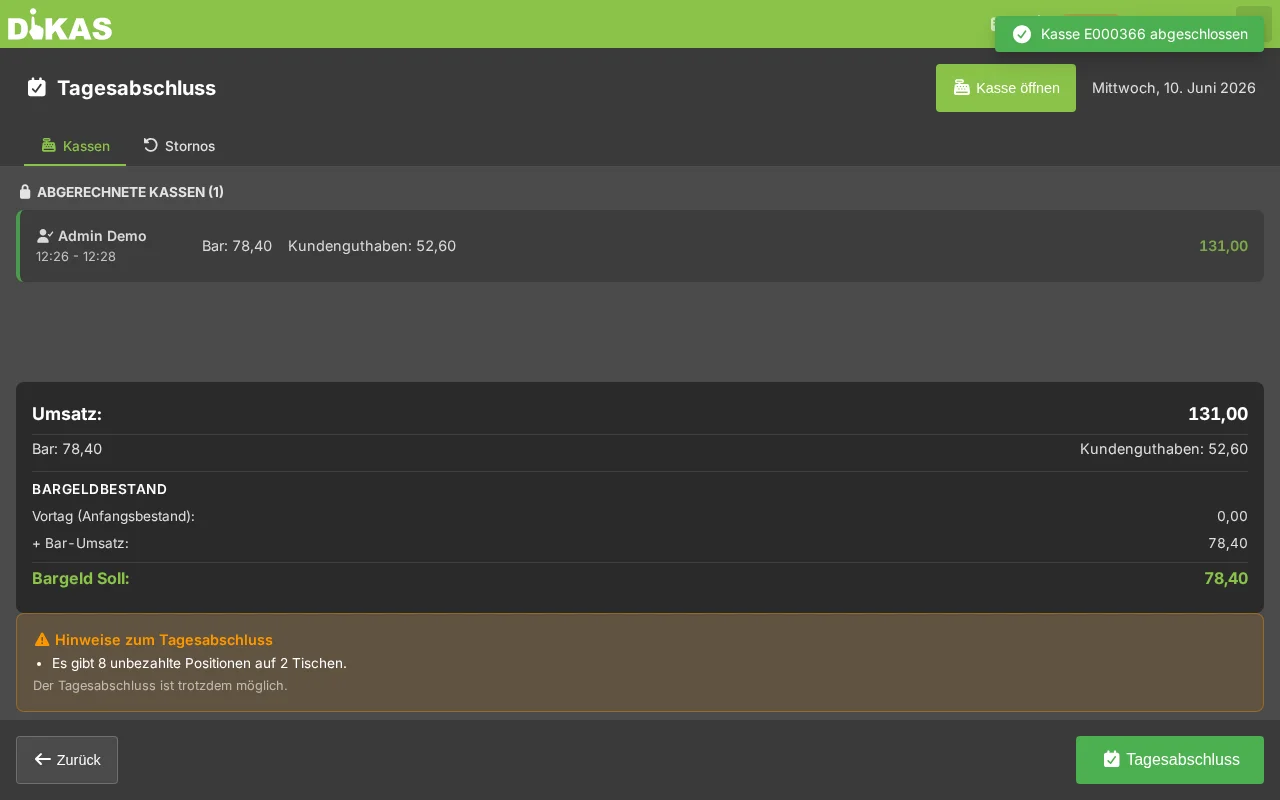
- Cash Registers: Shows all registers/shifts of the current day. A register can be open (active, not yet settled) or settled (shift closed).
- Voids: List of all voided receipts of the day.
Settling a Shift
- Open the Cash Registers tab
- Tap on the desired register
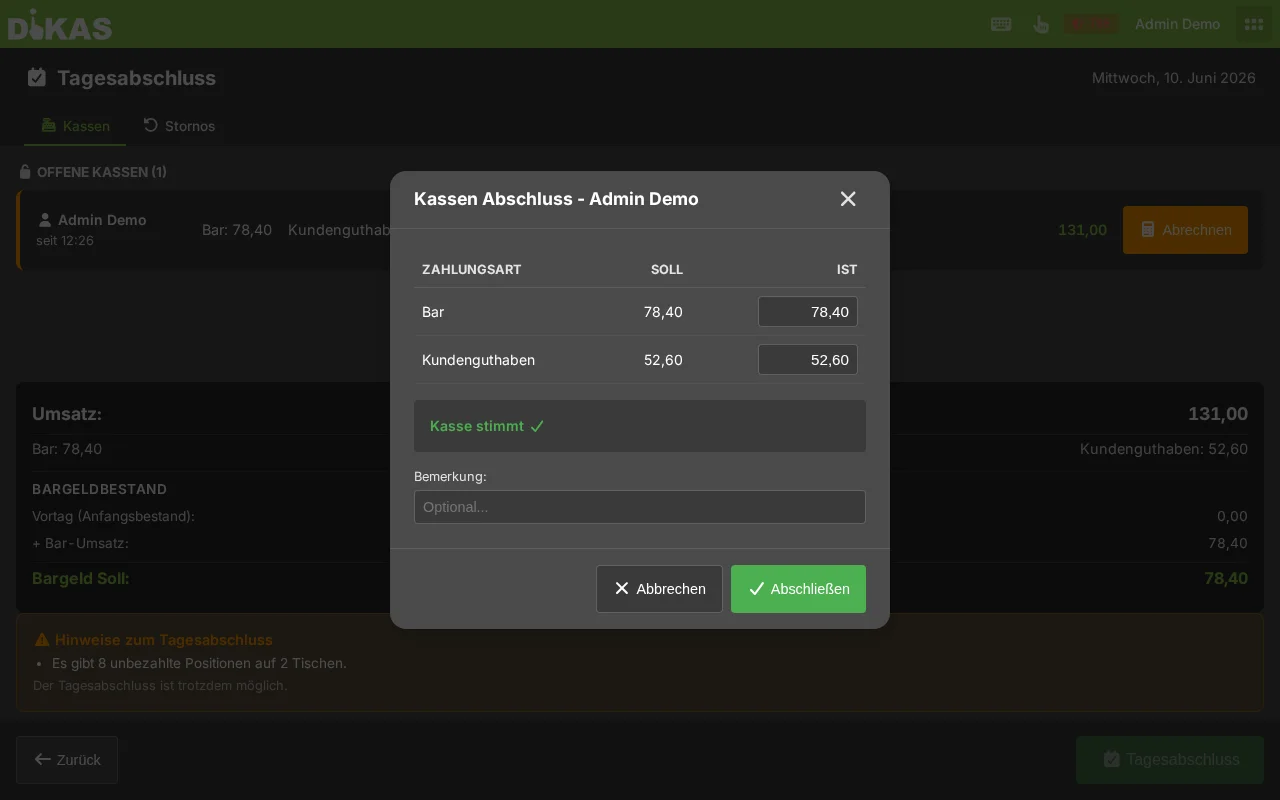
- Enter the actual cash count (opening the cash drawer — optional)
- Tap "Settle"
Blocking Issues (must be resolved before final close)
| Issue | Solution |
|---|---|
| Open staff switches | All shifts must be closed (close shift) |
| Already completed | This day has already been closed |
Warnings (can be acknowledged)
| Warning | Meaning |
|---|---|
| Open tables | There are still unpaid items on tables |
| Open guest tables | NFC guests have not yet paid |
| Clocked-in employees | Employees are still active in time tracking |
For clocked-in employees, DiKAS indicates whether auto clock-out is enabled. If so, employees will be automatically clocked out during the end-of-day report.
Performing the End-of-Day Report
- At the POS: Menu → End-of-day report
- The page shows a revenue summary and any warnings
- Optional: Perform a cash count (count the cash)
- Click "Perform end-of-day report"
- The Z-report is generated and TSE-signed
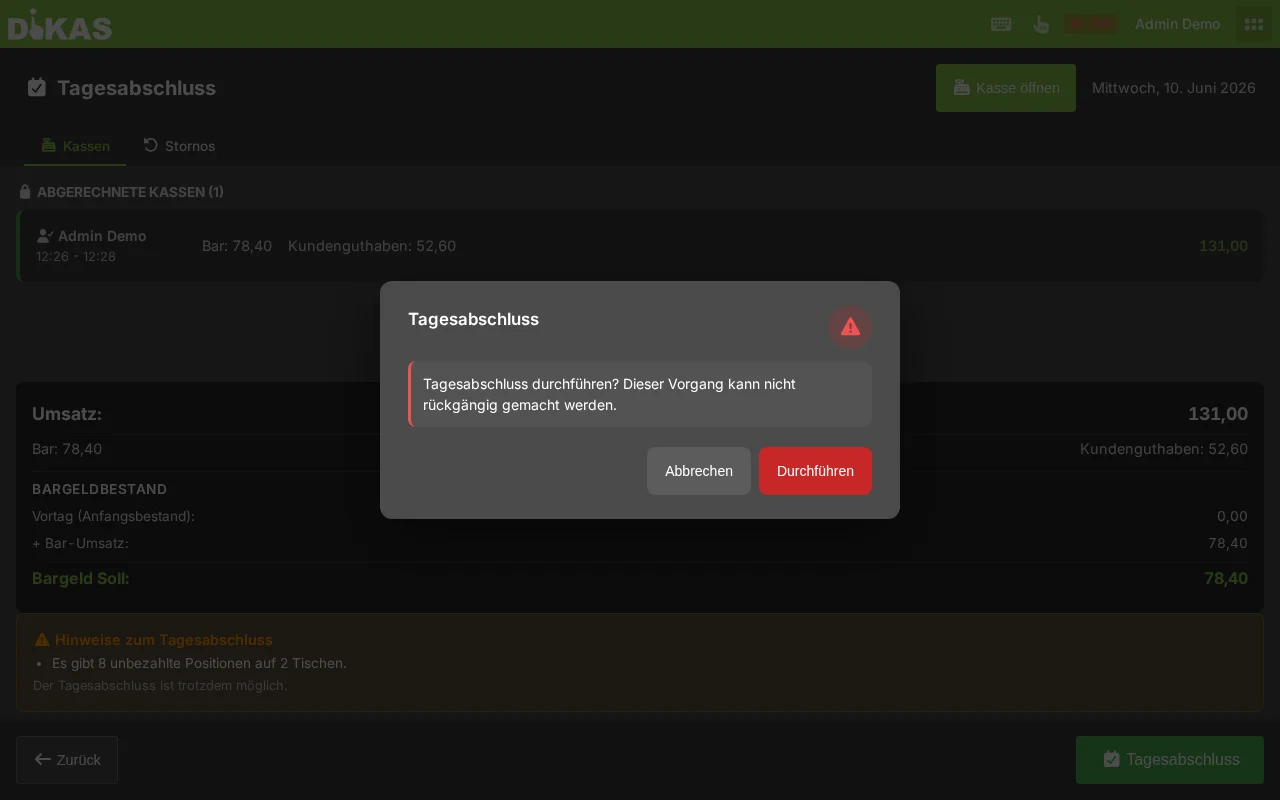
⚠️ Important: The end-of-day report is irreversible. After completion, no further transactions can be recorded for this business day.
EC Terminal Settlement & Card Totals Comparison
If a card terminal is connected via ZVT, a terminal settlement (end-of-day cut) can be performed after the end-of-day report:
- End-of-day report completed → message "End-of-day report complete" appears
- Tap the "Card Terminal Settlement" button
- The terminal prints a settlement receipt with the day's card turnover
The amount on the terminal settlement receipt should match the "Card payments" value in the Z-report. If the amounts differ, there may be an unrecorded transaction (e.g., a payment made directly at the terminal without DiKAS).
What Does the Z-Report Contain?
Revenue Overview
══════════════════════════════════════
  END-OF-DAY REPORT  Z-No. 47
  05.03.2026  Shift: Maria Schmidt
──────────────────────────────────────

  REVENUE
  Gross total:          1,247.80 EUR
  Net total:            1,057.85 EUR
  VAT total:              189.95 EUR

  TAX BREAKDOWN
  19%:   Net   821.18 EUR │ VAT  155.23 EUR
   7%:   Net   299.42 EUR │ VAT   34.72 EUR
   0%:   Net    50.00 EUR │ VAT    0.00 EUR

══════════════════════════════════════
Complete Items in the Z-Report
| Item | Description |
|---|---|
| Gross revenue | Total revenue incl. VAT |
| Net revenue | Total revenue excl. VAT |
| VAT breakdown | Separated by 19%, 7%, 0% (net + tax + gross per rate) |
| Payment methods | Cash, debit card, credit card, customer credit, voucher, house tab |
| Cash count | Opening balance + income − expenses = Expected vs. Actual |
| Receipt statistics | Number of receipts, first/last receipt no., average amount |
| Voids | Number and amount of voided receipts |
| Discounts | Total amount of discounts granted |
| Tips | Sum of all tips |
| Voucher statistics | Sold (count/amount), Redeemed (count/amount), Outstanding balance |
| Customer credit | Top-ups, usage, bonus top-ups, bonus usage, payouts |
| Customer points | Points earned, points redeemed, discount value |
| Expenses | Separated by cash expense, transfer, income, bank transfer |
| Deposit | Deposit collected and deposit returned |
| Waiter settlement | Revenue and receipt count per employee |
| Article groups | Revenue per article group |
| Article list | All sold articles (A–Z) with quantity and amount |
| Workstations | Revenue per POS/workstation |
Payment Method Breakdown
  PAYMENT METHODS
  Cash:                       687.30 EUR
  Debit card:                 412.50 EUR
  Credit card:                 98.00 EUR
  Customer credit:              25.00 EUR
  Voucher:                      25.00 EUR
Customer Credit Movements
  CUSTOMER CREDIT
  Top-ups:                    200.00 EUR
  Usage:                      -75.00 EUR
  Bonus top-ups:               20.00 EUR
  Bonus usage:                -12.00 EUR
  Payouts:                    -30.00 EUR
Voucher Statistics
Expenses Overview
  EXPENSES
  Cash expenses:               57.00 EUR
  Transfers:                   30.00 EUR
  Income:                      15.00 EUR
  Bank transfers:             120.00 EUR  (no cash register effect)
💰 Cash Count (Counting Money)
Before the end-of-day report, you should count the cash register contents:
- Count the cash in the register
- Enter the counted balance
- DiKAS compares it with the expected balance
- The difference is displayed
Cash Formula
Expected balance = Opening balance
                 + Cash income
                 + Income (AccountMode 3)
                 − Cash expenses (AccountMode 1)
                 − Transfers (AccountMode 2)
| Difference | Meaning |
|---|---|
| 0.00 EUR | Cash register is correct |
| + Amount | More money than expected (cash surplus) |
| − Amount | Less money than expected (cash shortage) |
ℹ️ Note: Small differences (under 1 EUR) are normal and arise from rounding during change calculation. The difference is documented in the Z-report.
What Happens During the End-of-Day Report?
The end-of-day report performs the following steps internally:
| Step | Description |
|---|---|
| 1 | Validation: Check open staff switches, prevent duplicate close |
| 2 | Load receipts: Collect all receipts for the business day |
| 3 | Calculate revenue: Gross, net, VAT, payment methods |
| 4 | Break down taxes: Grouping by tax rates |
| 5 | Waiter settlement: Revenue per employee |
| 6 | Article groups: Revenue per article group |
| 7 | Customer credit: Top-ups, usage, payouts |
| 8 | Customer points: Earned and redeemed points |
| 9 | Vouchers: Sold, redeemed, outstanding balance |
| 10 | Deposit: Collected and returned |
| 11 | Close expenses: Open expenses are assigned to the end-of-day report |
| 12 | TSE signing: Z-report is digitally signed (mandatory) |
| 13 | Draught system reset: Systems with "Reset on end-of-day" are reset |
| 14 | Auto clock-out: Still clocked-in employees are automatically clocked out (if enabled) |
Business Day
The business day in DiKAS runs from 06:00 to 05:59:59 of the following day. This ensures that night shifts (e.g., nightclub until 04:00) are correctly assigned to the right day.
🔐 TSE Signing
The end-of-day report is automatically TSE-signed with the ProcessType "AVKassenschnitt" (register cut). The TSE data is stored in the Z-report:
| TSE Field | Description |
|---|---|
| Transaction number | Unique TSE transaction ID |
| Signature | Digital signature from the TSE |
| Signature counter | Sequential counter |
| Start/end time | Timestamp of the signing |
| Serial number | TSE module serial number |
TSE signing is legally required (KassenSichV) and happens fully automatically in the background.
Automatic End-of-Day Report
You can configure an automatic end-of-day report:
- Admin → Settings → Operations
- Enable "Auto end-of-day report"
- Set time (e.g., 03:00 at night)
The report is then performed automatically — useful for businesses that occasionally forget to close. Automatic execution is only possible if no blocking issues exist (e.g., open staff switches).
Auto Clock-Out
If the option "Automatically clock out on end-of-day report" is enabled under Admin → Settings → Operations:
- During the end-of-day report, all still clocked-in employees are checked
- Employees on break are first taken off break (BreakEnd)
- Then an automatic clock-out entry is set
- Note: "Automatically clocked out (end-of-day report)"
- The names of clocked-out employees are listed in the Z-report
Viewing Past End-of-Day Reports
All past end-of-day reports can be found under:
Admin → Cash Book → End-of-Day Reports
| Column | Description |
|---|---|
| Z-No. | Sequential number |
| Date | Business day |
| Gross | Total revenue |
| Cash | Cash income |
| Card | Card income |
| Receipts | Number of receipts |
| Difference | Cash surplus/shortage |
| Closed by | Employee |
Click on an end-of-day report to view the complete Z-report.
Practical Example: Restaurant Close
Situation: Restaurant "Zur Linde", shift ends at 22:30.
- Check open tables: All tables are paid ✓
- Open end-of-day report: Menu → End-of-day report
- Check preview:
- 1 warning: "Lisa Müller is still clocked in" → will be automatically clocked out
- No blocking issues
- Cash count: Count cash → Enter 742.30 EUR → Difference: 0.00 EUR ✓
- Execute: Z-report is generated, TSE-signed
Z-Report No. 47 — 05.03.2026
  Gross:           1,247.80 EUR
  Cash:              687.30 EUR  (55.1%)
  Card:              510.50 EUR  (40.9%)
  Voucher:            50.00 EUR  (4.0%)
  Receipts:                  34
  Voids:                      2  (15.90 EUR)
  Vouchers sold:              3  (150.00 EUR)
  Expenses:           57.00 EUR
  Difference:          0.00 EUR
Frequently Asked Questions
Can I undo an end-of-day report? No. The end-of-day report is irreversible and TSE-signed. In case of errors, you can make a correction booking on the following day.
What happens if I forget the end-of-day report? You can perform the end-of-day report on the following day as well — it refers to the business day, not the current day. Alternatively, enable the automatic end-of-day report.
Do all tables need to be closed? No. Open tables are a warning, not an error. You can still perform the end-of-day report — the open tables will then be settled in the next end-of-day report.
What does "Deferred expenses" mean? Expenses with payment method "Bank transfer" (AccountMode 4) have no cash register effect — they are shown separately in the Z-report as "Deferred expenses" and do not affect the cash count.
How often should an end-of-day report be performed? At least once daily. With shift operations, a report can also be done per shift.
Next Step
→ Recording Expenses — Documenting cash withdrawals and expenses